Index Pocket Wikipedia 1.21+
Index Pocket Wikipedia Addon is a practical Minecraft Bedrock addon that brings a wiki-style encyclopedia directly into your game. Designed for MCPE players, it lets you search and view information about blocks, items, and mechanics without leaving your world, making gameplay smoother and easier to understand.
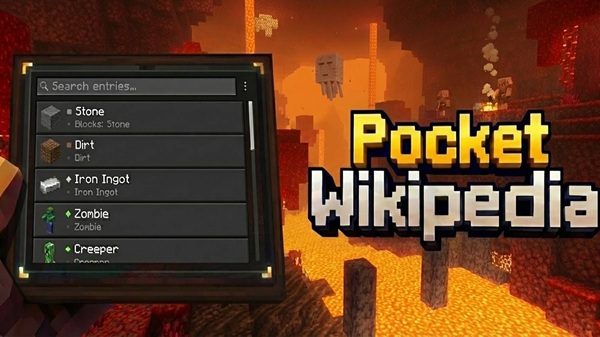
Index Pocket Wikipedia Addon – Minecraft Wiki Built In-Game
Minecraft has always rewarded curiosity. You explore, experiment, fail a little, and learn a lot. But when you play on mobile, constantly switching between the game and a browser to look things up can quickly ruin the flow. That’s where Index Pocket Wikipedia Addon fits in naturally.
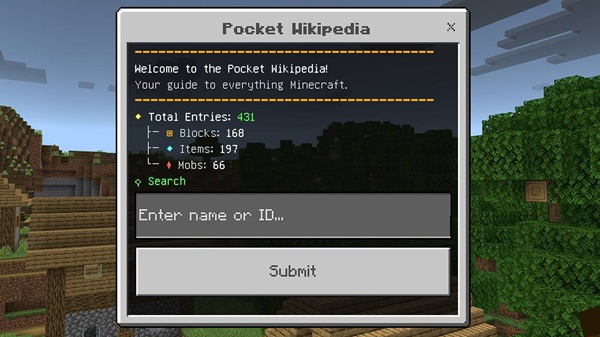
Designed for Minecraft Bedrock and MCPE players, Index Pocket Wikipedia Addon brings a wiki-style reference directly into your world. You get instant access to useful information while staying fully immersed in gameplay. No tab switching, no interruptions—just clear answers when you need them.
What Is Index Pocket Wikipedia Addon?
Before diving into features, it helps to understand what this addon is meant to be—and what it is not.
Index Pocket Wikipedia Addon is a utility-focused Minecraft addon that works as an in-game encyclopedia. Instead of changing mobs, blocks, or mechanics, it supports you with information. Think of it as a digital handbook that lives inside Minecraft itself.
It’s built for learning, reference, and convenience. If you’ve ever wondered how something works mid-game and wished you didn’t have to leave your world to find out, this addon was made for you.
Key Features Overview
At its core, this addon focuses on clarity and usability. Each feature supports quick access to information without clutter or distraction.
-
Built-in wiki interface integrated into Minecraft
-
Searchable entries for blocks, items, and mobs
-
Clean, touch-friendly layout optimized for MCPE
-
Works smoothly in Survival and Creative modes
-
Lightweight design that respects performance
These features work together to keep gameplay smooth while making knowledge easy to reach.
How the In-Game Wiki Works
This section is where the idea behind Index Pocket Wikipedia Addon becomes real. Understanding how it functions in-game helps you see its value instantly.
Accessing the Wiki Inside Minecraft
Once enabled, the addon provides a simple way to open the wiki from inside your world. The access method is designed to feel natural, so it doesn’t interrupt movement, building, or exploration.
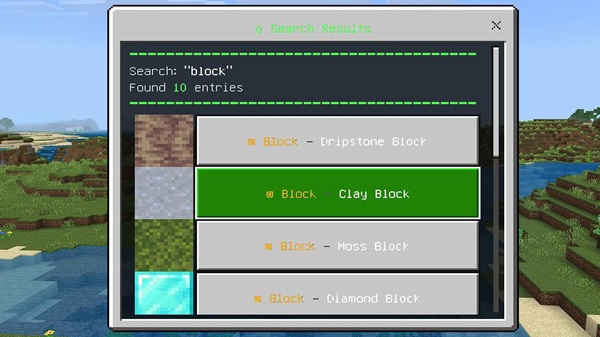
Searching for Blocks, Items, and Mobs
You can search by name to find specific entries. For example, if you’re unsure how a certain block works or what a mob drops, you simply type it in and get results immediately.
Viewing Information While Playing
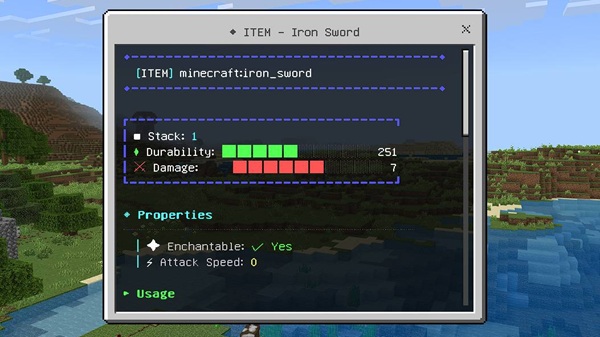
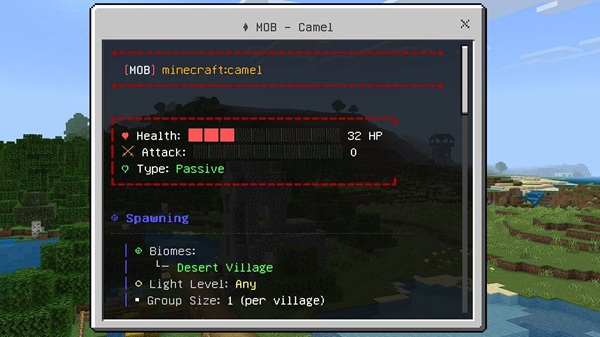
Information appears directly on your screen in a readable format. On smaller mobile displays, this matters a lot. The layout is clean, so you can read comfortably without pausing the game.
Linked Entries and Easy Navigation
Entries connect to related topics, allowing you to move between information smoothly. This makes learning feel more natural, especially when you’re exploring new mechanics.
Using the Wiki in Survival and Creative Mode
In Survival, the wiki supports planning and progression. In Creative, it becomes a reference tool for testing ideas and learning systems without guesswork.
Why This System Is Ideal for MCPE
Everything stays inside the game. For mobile players, that means fewer interruptions and a more immersive experience from start to finish.
Why This Addon Is Ideal for MCPE Players
MCPE players deal with smaller screens, limited multitasking, and touch controls. This addon is clearly designed with those realities in mind.
By keeping information in-game, Index Pocket Wikipedia Addon helps you:
-
Learn mechanics as you play
-
Make decisions faster
-
Stay focused on building and exploring
The result is gameplay that feels smoother and more confident, especially during longer sessions.
Compatibility & Requirements
Before using the addon, it’s good to know what it supports and how to get the best results.
-
Compatible with modern Minecraft Bedrock versions
-
Works on Android, iOS, and Windows 10/11
-
Some features may require experimental settings
-
Generally safe to use alongside other lightweight addons
Keeping Minecraft updated helps ensure stable performance.
Tips for the Best Experience
A few small habits can make a big difference when using utility addons.
-
Test the addon in single-player first
-
Avoid stacking multiple UI-heavy addons
-
Keep your game version up to date
-
Use the wiki to learn, not to rush progress
These tips help maintain balance and performance.
Who Should Use This Addon?
This addon fits a wide range of play styles, but it’s especially helpful for:
-
New players learning Minecraft basics
-
Survival players who need quick references
-
Builders planning materials and mechanics
-
MCPE users who prefer simple utility tools
If you enjoy understanding how Minecraft works, this addon fits naturally into your world.
Final Thoughts
Index Pocket Wikipedia Addon turns Minecraft knowledge into something you can access instantly, without breaking immersion. By placing a wiki directly inside the game, it supports learning, planning, and confident gameplay—especially on mobile devices.
If you value clarity, convenience, and a smoother MCPE experience, Index Pocket Wikipedia Addon is a practical addition that enhances how you play without changing what makes Minecraft feel like Minecraft.
How to Install Index Pocket Wikipedia Addon on MCPE
Installing the addon is straightforward, even if you’re new to Minecraft addons.
-
Download the addon file in
.mcaddonformat -
Open the file to import it into Minecraft
-
Create a new world or edit an existing one
-
Activate the addon in Behavior Packs
-
Enable any required Experimental Features
-
Start or restart the world to apply changes
The process is simple and doesn’t require technical knowledge.