RMPlaysMCYT’s Plane 1.21+
RMPlaysMCYT’s Plane Addon adds real, flyable aircraft to Minecraft Bedrock Edition, giving MCPE players smooth flight controls, multiplayer support, and a reliable way to explore their worlds from the sky.
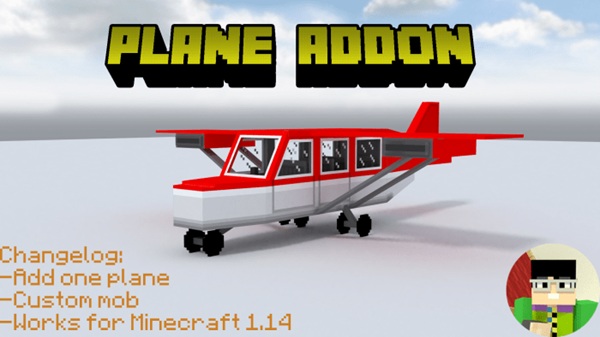
RMPlaysMCYT’s Plane Addon – Real Aircraft That Truly Fly
Finding a plane addon that works smoothly on Minecraft Pocket Edition is not always easy. Many addons promise flight but end up offering decorative models, unstable controls, or mechanics that break immersion on mobile devices. RMPlaysMCYT’s Plane Addon approaches this problem differently. It focuses on functional aircraft, reliable controls, and a flying experience designed specifically for MCPE and Bedrock Edition.
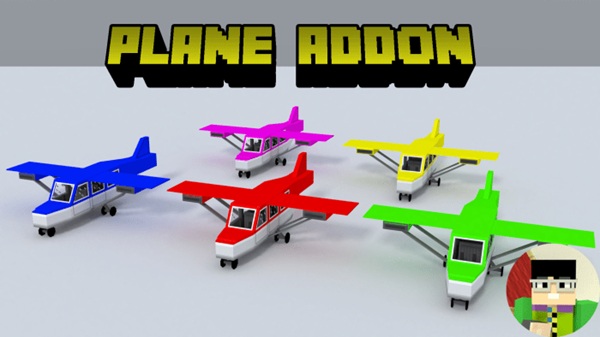
If you enjoy exploring large worlds, building modern cities, or traveling with friends, this addon introduces aircraft that feel natural to use and dependable during real gameplay.
What Is RMPlaysMCYT’s Plane Addon?
Before diving into flight mechanics, it helps to understand what this addon actually adds to your Minecraft world and why it stands out among Bedrock vehicle addons.
RMPlaysMCYT’s Plane Addon introduces a selection of flyable aircraft that function as rideable entities in Minecraft Bedrock Edition. Instead of acting like static props, these planes respond directly to player input and are built to work smoothly on mobile devices.
The addon supports:
-
Creative Mode and multiplayer worlds
-
Mobile, tablet, and Bedrock platforms
-
Practical gameplay use rather than visual-only features
The overall goal is simple: aircraft that you can actually use in everyday Minecraft play.
What “Real Aircraft That Truly Fly” Means in Gameplay
This section is the heart of the addon. The phrase “real aircraft” does not mean complex simulation but rather consistent, controllable flight that behaves as players expect in Minecraft Bedrock.
How Aircraft Movement Works in Bedrock Edition
Aircraft move using steady forward motion instead of floating or teleporting. Steering feels responsive, allowing you to turn smoothly and maintain control while traveling long distances. This creates a sense of intention behind every movement, which is especially important on touch screens.
Takeoff, Flight, and Landing Behavior
Planes perform best when launched from open areas, such as flat terrain or custom runways. Once airborne, flight remains stable and predictable. Landing is controlled rather than abrupt, helping you stop safely without getting stuck in blocks or terrain.
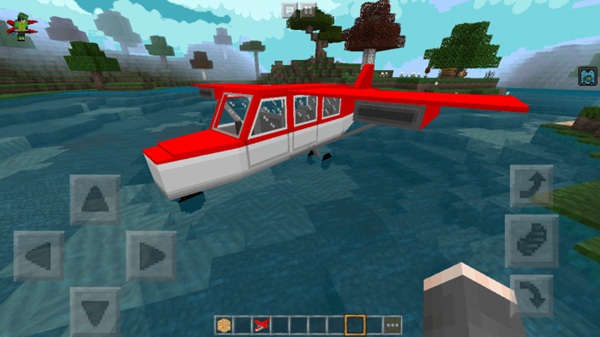
Mobile Controls and Player Input
Controls are designed with touch-based gameplay in mind. You guide direction using movement input, while altitude changes are handled by looking up or down. For example, tilting your view upward helps the plane gain height, while looking downward allows it to descend. This keeps flying intuitive, even for new MCPE players.
Difference Between Decorative Models and Functional Aircraft
Some plane addons only offer visual models that look impressive but do not truly interact with gameplay. RMPlaysMCYT’s Plane Addon focuses on active control, ensuring aircraft respond reliably during flight sessions and remain usable in long-term worlds.
Stability and Responsiveness During Flight
Performance remains consistent during flight, with minimal lag or sudden movement changes. This stability is important for mobile devices, where smooth input response can make or break the experience.
Multiplayer Flight Behavior
Aircraft support multiple players at once. One player pilots the plane, while others ride as passengers. This works well in shared Bedrock worlds and allows friends to travel together without issues.
Mobile-Friendly Controls and Flight Experience
Flying in MCPE can feel frustrating if an addon is built around keyboard controls. This addon avoids that issue by keeping controls simple and mobile-first.
You do not need extra items, commands, or complex setups. The learning curve stays gentle, which makes the addon accessible to younger players and casual users while still feeling satisfying for experienced players.
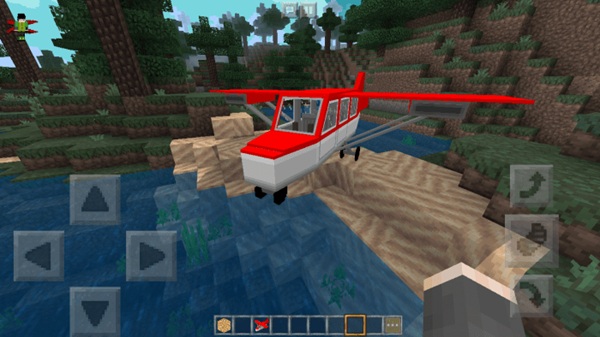
Multiplayer and Shared Flying Experience
Flying together adds a new layer to multiplayer gameplay. This addon supports shared aircraft use, making travel more social and interactive.
Common uses include:
-
Exploring distant biomes together
-
Transporting friends between bases
-
Supporting cooperative creative builds
Aircraft remain stable even with passengers onboard, which helps preserve immersion during group play.
Compatibility and Performance on MCPE
RMPlaysMCYT’s Plane Addon is compatible with modern Minecraft Bedrock Edition versions and runs on:
-
Android devices
-
iOS devices
-
Windows Bedrock Edition
For best performance, avoid combining many vehicle addons in one world and test new content in a backup copy first.
Best Ways to Use This Addon
This addon adapts well to different play styles, making it more than just a novelty.
-
Creative Mode: Airports, hangars, and city builds
-
Survival Mode: Faster travel across large maps
-
Multiplayer Worlds: Group exploration and transport
-
Roleplay Worlds: Transportation-focused themes
-
Custom Maps: Functional air travel mechanics
Helpful Tips for First-Time Flyers
If you are new to aircraft addons, these tips can help:
-
Start flying in open areas
-
Practice short flights before long journeys
-
Avoid tight spaces while learning controls
-
Spawn planes in Creative Mode for testing
-
Always back up your world before adding addons
These small steps help prevent frustration and improve your experience.
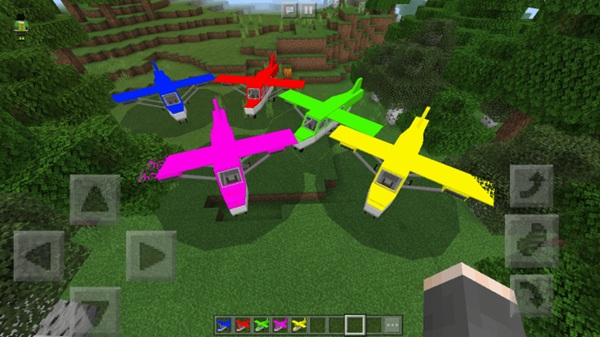
Final Thoughts: Who This Addon Is Best For
RMPlaysMCYT’s Plane Addon is best suited for MCPE players who want aircraft that actually work. If you value smooth controls, stable performance, and multiplayer-friendly features, this addon fits naturally into Bedrock gameplay.
Whether you are building modern cities, exploring large survival worlds, or flying with friends, this addon offers a reliable and enjoyable way to take to the skies in Minecraft Bedrock Edition.
How to Install the Addon on MCPE (Simple Steps)
Installation is quick and does not require additional tools or launchers.
-
Import the addon file into Minecraft
-
Activate the Behavior Pack and Resource Pack
-
Enable experimental features if prompted
-
Enter your world and start using the aircraft
The addon works in both new and existing worlds.