Train Cargo 1.21+
Train Cargo Addon adds modular freight trains to Minecraft Bedrock Edition, letting you build immersive rail systems with detailed cargo cars, visual customization, and mobile-friendly performance.
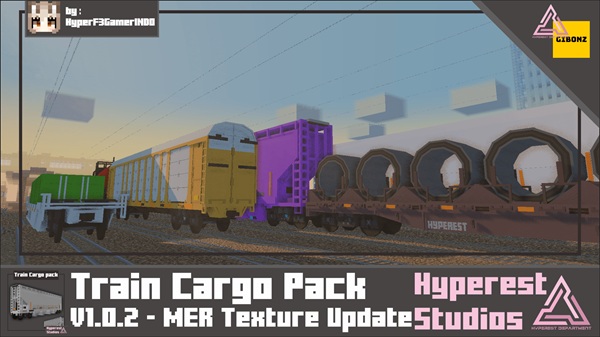
Train Cargo Addon – Modular Freight Trains That Feel Alive
Train Cargo Addon introduces modular freight trains to Minecraft Bedrock Edition (MCPE), giving you a more immersive way to build rail systems that feel active and meaningful. Instead of placing static objects on rails, this addon lets you design freight trains that visually communicate purpose, scale, and movement.
Built with mobile and Bedrock players in mind, Train Cargo Addon blends smoothly into creative worlds, roleplay maps, and long-term survival builds. It focuses on visual interaction and modular design, allowing your railways to become a living part of your Minecraft world rather than background decoration.
What Makes Train Cargo Addon Feel “Alive”
At its core, Train Cargo Addon is designed around one idea: rail systems should look and feel active. This section explains how visual details and interaction create that sense of life, especially on MCPE where clarity and feedback matter most.
Animated Doors and Interactive Cargo Cars
Many cargo cars include animated doors that open and close through simple in-game interaction. These animations add function to form, making each car feel usable rather than decorative.
Visible Cargo That Reflects the Train’s Purpose
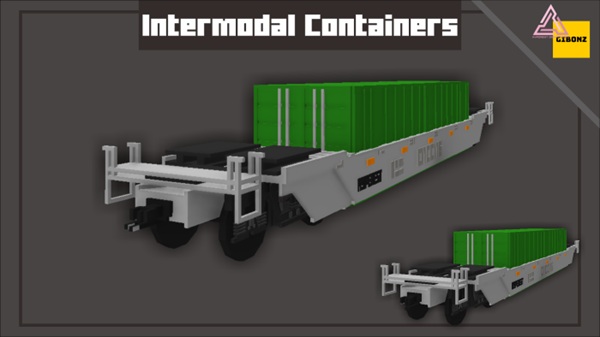
Cargo appears visually inside or on the cars, helping you instantly understand what a train represents. A loaded freight train arriving at a depot tells a story without a single line of text.
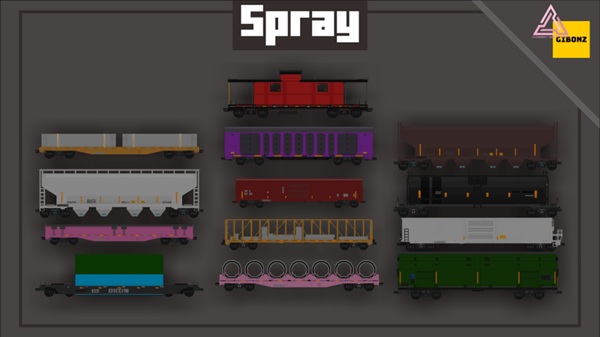
Multiple Cargo Car Types with Distinct Designs
Each cargo car has a unique structure and silhouette. This variety breaks repetition and keeps long trains visually interesting as they move through cities, tunnels, and industrial zones.
Modular Train Lengths and Configurations
You can link multiple cars together, forming anything from short local runs to long freight convoys. This flexibility lets your trains scale naturally with your world.
Why These Details Matter on MCPE
On mobile devices, immersion relies heavily on visuals. Train Cargo Addon delivers depth through what you see, not complex mechanics, keeping gameplay smooth and accessible.
Modular Freight Train System Explained
The modular system is what gives Train Cargo Addon its creative strength. Instead of spawning a single finished vehicle, you build trains piece by piece, just like real freight systems.
-
Combine different cargo cars into one train
-
Adjust train length to match routes or stations
-
Create multiple trains for different purposes
-
Reuse car types across various rail lines
This approach encourages experimentation and helps your rail network feel intentional rather than random.
Cargo Car Types & Visual Customization
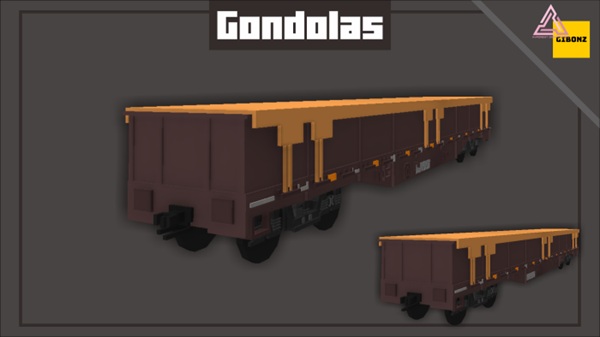
Train Cargo Addon includes several freight car styles, each suited to a different visual role. These range from enclosed cargo cars to open and specialized freight designs.
To keep large rail systems readable, the addon also supports visual customization.
Color Variants
Each cargo car comes in multiple colors, allowing you to:
-
Assign colors to specific rail routes
-
Create company or faction identities
-
Match trains to biomes or city themes
Color-coding becomes especially useful in larger MCPE worlds where multiple trains operate at once.
How to Use Train Cargo Addon in MCPE
Using Train Cargo Addon is designed to be simple and approachable, even if you are not used to technical addons.
-
Train cars are spawned using standard Minecraft Bedrock commands
-
Cars can be linked together to form complete freight trains
-
Doors and cargo visuals can be interacted with using provided tools
-
Name tags or anvils help you label trains for organization
This makes the addon suitable for Creative Mode, roleplay servers, and structured survival builds.
Gameplay Use Cases
Train Cargo Addon adapts well to different play styles and world types.
-
City builds benefit from realistic stations and rail yards
-
Survival worlds gain visual transport routes and themed infrastructure
-
Roleplay maps use trains for deliveries, companies, and schedules
-
Decorative worlds gain moving scenery and scale
Whether you focus on storytelling or visual design, the addon supports your vision.
Compatibility & Performance on Mobile
Train Cargo Addon is designed with performance in mind:
-
Compatible with Minecraft Bedrock / MCPE 1.21+
-
Optimized for mobile devices
-
Best performance when train length is kept reasonable
-
Works in multiplayer when resource packs are enabled
When used thoughtfully, it runs smoothly on most modern devices.
Tips for the Best Experience
-
Keep freight trains at manageable lengths
-
Use consistent colors and naming conventions
-
Build stations, depots, and platforms for realism
-
Separate freight routes from decorative rail lines
-
Back up your world before adding new addons
These small habits make a big difference in long-term worlds.
Final Thoughts
Train Cargo Addon is ideal if you want rail systems that feel modular, immersive, and visually alive in Minecraft Bedrock Edition. Its focus on interaction, customization, and visual storytelling makes it a strong choice for MCPE builders, roleplayers, and creative players.
If you enjoy designing infrastructure and watching your world feel more connected, Train Cargo Addon fits naturally into that experience.
Installation Guide (MCPE / Bedrock)
Installing Train Cargo Addon is straightforward:
-
Import the
.mcaddonfile into Minecraft -
Create a new world or edit an existing one
-
Activate both the Resource Pack and Behavior Pack
-
Enable required experimental settings if prompted
-
Enter the world and start building
These steps work on Android, iOS, and Windows Bedrock Edition.