Dynamic Health Bar 1.21+
The Dynamic Health Bar Addon improves Minecraft Bedrock gameplay by showing real-time health bars above entities. It helps MCPE players better understand combat situations, track entity health instantly, and enjoy clearer, more controlled gameplay without changing core mechanics.
Dynamic Health Bar Addon – Real-Time Health Visibility
The Dynamic Health Bar Addon is designed for players who want clearer, more reliable feedback during Minecraft Bedrock gameplay. Instead of guessing how much health an entity has left, you can see it directly and instantly. This small change has a big impact, especially on MCPE, where screen size and touch controls can make combat harder to read.

If you’ve ever paused mid-fight wondering whether to continue or step back, this addon was made for you. By improving real-time health visibility, the Dynamic Health Bar Addon helps you stay focused, confident, and in control—without changing Minecraft’s core mechanics.
What Is the Dynamic Health Bar Addon?
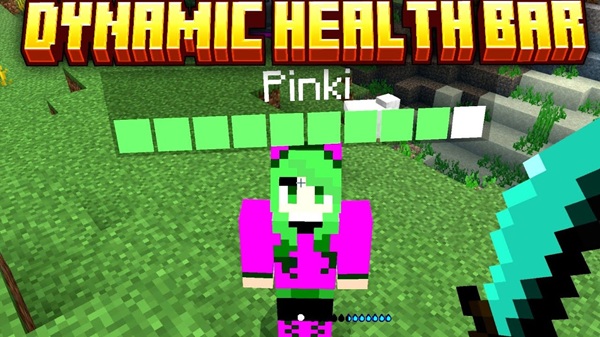
At its core, the Dynamic Health Bar Addon adds floating health indicators above entities in Minecraft Bedrock Edition. These indicators update live as health changes, giving you accurate feedback exactly when you need it.
Instead of hiding health behind invisible values, the addon brings that information into the world in a natural way. It doesn’t replace your HUD or alter how damage works. It simply makes health easier to understand, which is especially helpful in survival worlds, custom maps, and modded environments.
Key Features
The strength of the Dynamic Health Bar Addon lies in how it balances information and simplicity. Each feature is designed to improve visibility while staying lightweight and mobile-friendly.
Real-Time Health Bars for Entities
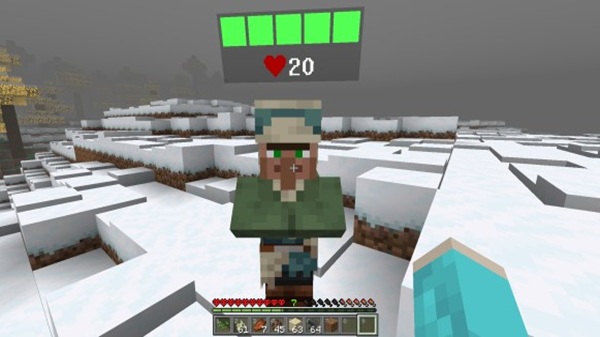
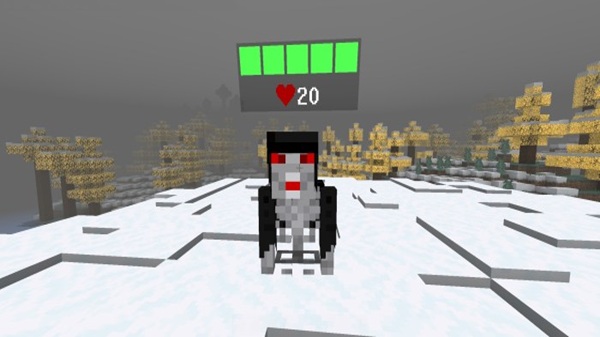
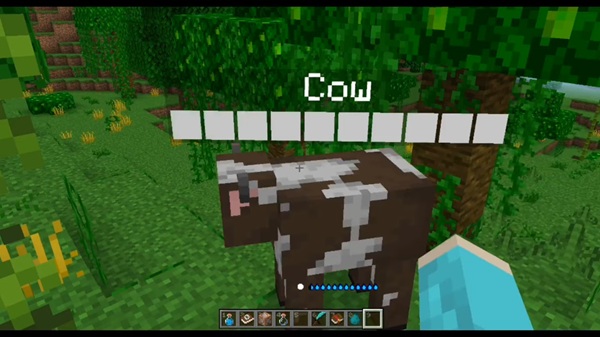
Health bars appear above mobs and other entities when they are active or interacted with. As damage or healing occurs, the bar updates instantly, so you always know the current state.
For MCPE players, this means fewer surprises and smoother gameplay, even during fast-paced encounters.
Color-Based Health Status Indicators
Instead of relying only on numbers, the addon uses color changes to show health levels. Higher health appears calmer, while lower health becomes more noticeable.
This approach works well on mobile screens, where quick visual cues matter more than detailed UI elements.
Optional Damage Feedback
Some versions of the Dynamic Health Bar Addon include optional damage indicators. When enabled, brief damage values appear to show how effective your tools or enchantments are.
For example, if you’re testing different swords or enchantments, this feedback helps you understand the difference without opening menus or stopping gameplay.
Support for Modded and Custom Entities
The addon reads health data directly from entities, which allows it to work with many addon-added mobs automatically. You don’t need to configure anything manually.
This makes the Dynamic Health Bar Addon a strong companion for RPG-style worlds, custom bosses, and modded survival setups.
Lightweight and Mobile-Friendly Design
Performance matters on MCPE. That’s why this addon is built to run efficiently on a wide range of devices.
Health bars are rendered only when needed, helping maintain stable performance during normal gameplay.
Clean Visual Style That Fits Bedrock
Visually, the addon respects Minecraft Bedrock’s design language. The health bars are subtle, readable, and well-sized.
They enhance visibility without pulling attention away from the world, which keeps the experience immersive and comfortable.
How It Works In-Game
Once enabled, the Dynamic Health Bar Addon works automatically in the background. Health bars appear when entities are active or engaged and update in real time as health changes.
At longer distances, the display may scale down or fade to reduce clutter. During exploration, the addon stays unobtrusive and becomes noticeable only when health information is relevant.
Compatibility & Requirements
Before using the addon, it helps to know where it works best:
-
Minecraft Versions: Supported on modern Minecraft Bedrock releases
-
Devices: Android, iOS, Windows 10/11
-
Realms: Supported when the world is uploaded correctly
-
Achievements: May be disabled due to behavior pack usage
Keeping your game updated ensures the best experience.
Best Use Cases
The Dynamic Health Bar Addon fits naturally into many play styles:
-
Survival and advanced survival worlds
-
RPG-style gameplay with custom mobs
-
Adventure maps and structured encounters
-
Multiplayer worlds where shared awareness matters
It’s ideal if you want clearer information without changing how Minecraft feels.
Tips for Best Experience
To get the most out of the addon:
-
Avoid stacking too many UI-based addons
-
Combine it with mob or RPG addons for better synergy
-
Keep entity-heavy areas reasonable to maintain performance
-
Update Minecraft regularly to prevent visual issues
Known Limitations
Like any addon, there are a few things to keep in mind:
-
Achievements may be disabled
-
Large numbers of entities can affect performance
-
UI-focused addons may overlap visually
Understanding these limits helps you plan your setup better.
Summary
The Dynamic Health Bar Addon offers a practical and well-balanced improvement to Minecraft Bedrock by delivering real-time health visibility in a clean, mobile-friendly way. It helps you read situations faster, make better decisions, and enjoy smoother gameplay—especially on MCPE.
If you value clarity, performance, and subtle design, this addon is a strong addition to your Minecraft world.
Installation Guide (MCPE / Bedrock)
Installing the Dynamic Health Bar Addon is simple and familiar for Bedrock players:
-
Download the addon file (
.mcaddonor.mcpack) -
Open the file with Minecraft to import it
-
Create or edit a world
-
Enable both the Resource Pack and Behavior Pack
-
Adjust required world settings if prompted
-
Enter the world and play
No extra configuration is needed once the addon is active.