Teleport Pads 1.21+
Teleport Pads Addon adds a smart fast travel system to Minecraft Bedrock and MCPE, allowing you to move between linked locations easily without commands. It’s designed for mobile performance, survival balance, and smooth gameplay in both singleplayer and multiplayer worlds.
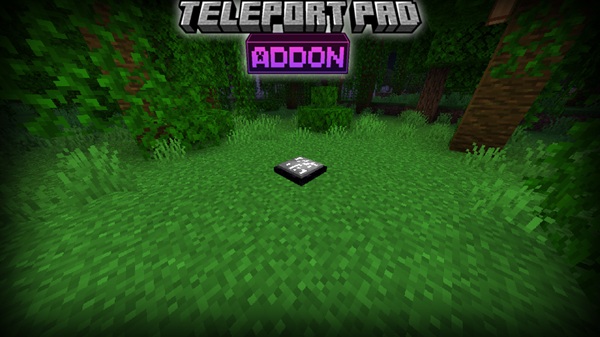
Teleport Pads Addon – Smart Fast Travel System
If you play Minecraft Bedrock or MCPE long enough, you know the feeling. Your main base is here, your farms are far away, and that great mining spot is thousands of blocks out. Travel slowly turns into routine walking instead of real gameplay. This is exactly where Teleport Pads Addon fits naturally into your world.
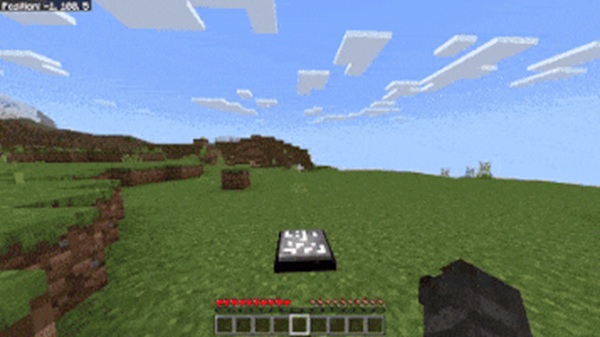
Teleport Pads Addon introduces a smart fast travel system made for MCPE and Bedrock Edition. It helps you move between important locations quickly while keeping the survival experience balanced and intuitive. No commands, no complex setup—just practical fast travel designed for mobile players.
What Is Teleport Pads Addon?
Before diving into features, it helps to understand what Teleport Pads Addon actually adds to your game and how it fits into normal Bedrock gameplay.
Teleport Pads Addon is a Minecraft Bedrock addon that introduces teleport pad blocks. These pads can be placed and linked together, allowing you to travel between locations such as bases, farms, villages, or hubs. The system feels built-in rather than forced, making it easy to use even if you’ve never touched advanced addons before.
This addon works well in survival worlds, creative builds, and multiplayer environments where movement efficiency matters.
Key Features
Teleport Pads Addon focuses on simplicity and reliability. Instead of overwhelming you with options, it delivers a clear fast travel system that works consistently across devices.
Key features include:
-
Teleport pad–based fast travel system
-
Linked teleport pads for location-to-location travel
-
Compatible with Survival and Creative modes
-
No command blocks or manual commands required
-
Works in multiplayer and Realm worlds (with experimental features)
-
Optimized for MCPE and mobile performance
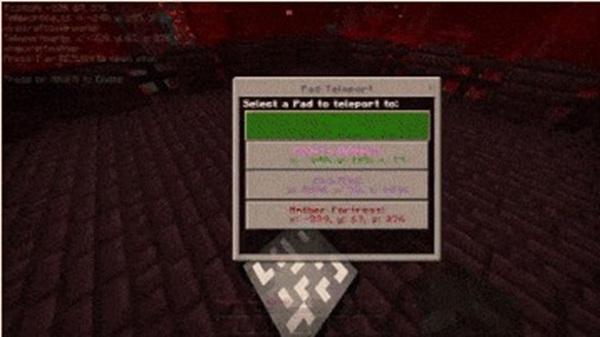
How the Teleport Pads Work In-Game
This section explains how the system functions in real gameplay, from placement to everyday use. Understanding this part helps you decide how the addon fits into your world.
Placing Teleport Pads in the World
Teleport pads are placed like normal blocks. Many players install them near their main base entrance, inside farms, or at mining access points. You can hide pads under floors or design them into builds for a clean look.
Linking Teleport Pads Together
Once placed, teleport pads can be linked to define travel destinations. Each linked pad knows where it should send you. If a pad is broken or moved, it can be re-linked without affecting the rest of your world.
Activating Teleportation
Teleportation activates when you step onto or interact with the pad, depending on how the addon is configured. The process feels smooth and quick, which is especially important for MCPE players using touch controls.
Travel Behavior and Limitations
Teleport Pads Addon supports both short- and long-distance travel. Any limits are intentional and help keep gameplay fair, especially in survival worlds.
Common Gameplay Use Cases
-
Base-to-base travel
-
Fast access to farms and mines
-
Multiplayer hub systems
-
Adventure maps and creative projects
Survival-Friendly Design Considerations
The addon is designed as a convenience tool, not a shortcut exploit. You still explore, build, and progress normally—just with less repetitive walking.
Survival & Creative Gameplay Balance
Teleport Pads Addon is carefully balanced to support different play styles. In survival mode, it acts as a quality-of-life improvement that respects progression and planning. You still decide where pads go and how your world is organized.
In creative mode, the addon becomes a productivity tool. Builders and map makers can move between locations instantly, test builds faster, and manage large projects without interruptions.
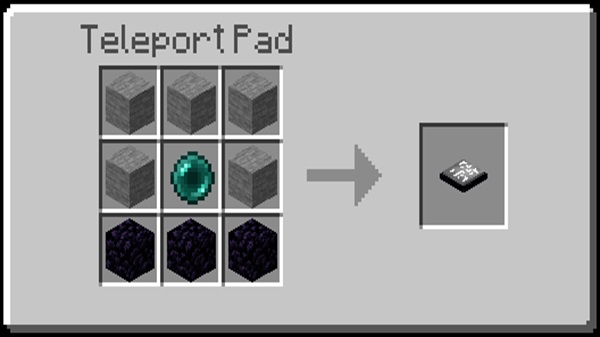
Compatibility & Requirements
Teleport Pads Addon is built specifically for Bedrock platforms and works across most supported devices.
-
Minecraft Bedrock / MCPE (1.19+ recommended)
-
Android, iOS, Windows 10/11, and supported consoles
-
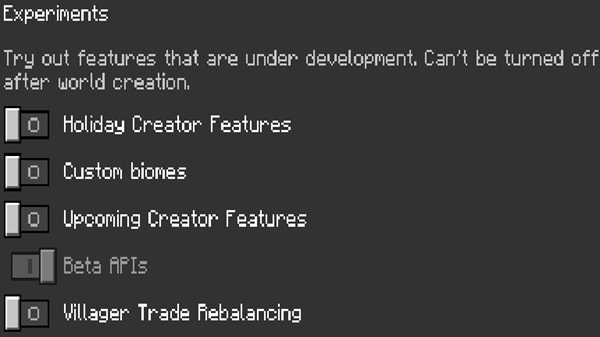
Multiplayer and Realms supported with experimental features enabled
-
Some versions may require Holiday Creator Features or Beta APIs
Performance & Mobile Optimization
Performance matters on mobile, and Teleport Pads Addon is designed with that in mind. The addon is lightweight and avoids heavy systems that could impact FPS or world stability.
For best results:
-
Use teleport pads for main travel routes
-
Avoid overcrowding small areas with too many pads
-
Test setups in multiplayer worlds before long-term use
Tips for Best Use
A few practical habits can make the addon even more effective:
-
Place pads at locations you visit often
-
Organize pads by purpose (bases, farms, hubs)
-
Avoid breaking linked pads accidentally
-
Use teleport pads to encourage larger builds and exploration
-
Combine with building or roleplay addons for richer worlds
Frequently Asked Questions (FAQ)
Is Teleport Pads Addon survival-friendly?
Yes. It’s designed as a balanced quality-of-life feature.
Does it work in multiplayer worlds?
Yes, with experimental features enabled.
Can I add it to an existing world?
Yes, though backing up your world is recommended.
Are commands required?
No. The addon works without command blocks.
Will it affect mobile performance?
It’s optimized for MCPE and runs smoothly on most devices.
Final Thoughts
Teleport Pads Addon provides a smart, reliable fast travel system for Minecraft Bedrock Edition. It reduces repetitive travel while keeping gameplay natural, balanced, and mobile-friendly.
If you enjoy building large worlds, managing multiple locations, or playing multiplayer on MCPE, Teleport Pads Addon can quietly become one of the most useful tools in your world—saving time without changing what makes Minecraft feel like Minecraft.
How to Install on MCPE (Step-by-Step)
Installation is simple and beginner-friendly, even if you’re new to addons.
-
Download the addon file (
.mcaddonor.mcpack) -
Open the file to import it into Minecraft
-
Enable both the Resource Pack and Behavior Pack in world settings
-
Turn on required Experimental Gameplay options
-
Start or reload your world
Backing up existing worlds before installation is always recommended.