Easy Bonsai 1.21+
Easy Bonsai Addon introduces a compact, redstone-free farming system for Minecraft Bedrock and MCPE. Grow trees and plants in small bonsai pots, save space, and enjoy simple automation designed for mobile-friendly survival gameplay.
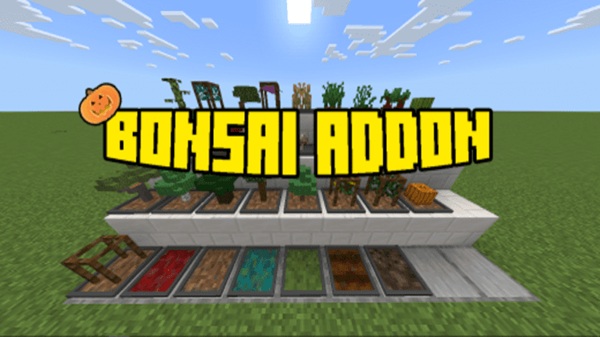
Easy Bonsai Addon – Compact Farming Without Redstone
The Easy Bonsai Addon is a smart solution for Minecraft Bedrock and MCPE players who want reliable resource farming without dealing with redstone systems or oversized farms. It introduces a compact bonsai-style mechanic that lets you grow trees and plants in a small space, using simple gameplay mechanics that feel natural in survival mode.
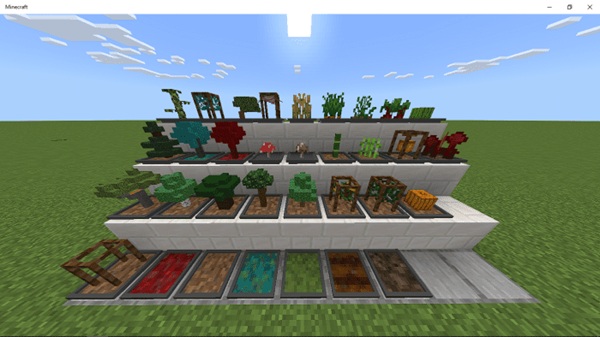
If you play on mobile, manage a small base, or enjoy Skyblock-style worlds, Easy Bonsai Addon helps you stay productive without turning farming into a repetitive task.
Easy Bonsai Addon Overview
At its core, Easy Bonsai Addon rethinks how farming works in Minecraft Bedrock Edition. Instead of spreading crops across large fields or building complex machines, you use bonsai pots to grow resources efficiently in one place. This approach suits MCPE players who value clarity, performance, and ease of use.
The addon is designed around three ideas: compact design, minimal interaction, and smooth performance. Everything works inside normal survival gameplay, without commands or advanced systems.
Why Compact Farming Matters in MCPE
Compact farming isn’t just a design choice—it’s a practical need for Bedrock and mobile players. MCPE worlds often run on limited hardware, and large farms can quickly become frustrating to manage.
On mobile devices:
-
Touch controls make large farms slower to harvest
-
Big layouts take up valuable building space
-
Heavy systems may reduce performance
In Skyblock or One Block worlds, space is even more limited. Easy Bonsai Addon solves this by keeping farming small, controlled, and efficient, allowing you to focus on building and progression instead of maintenance.
Key Features of Easy Bonsai Addon
This section highlights what most players want to know first: what the addon actually does and why it’s useful.
Compact Bonsai Pots for Small Bases
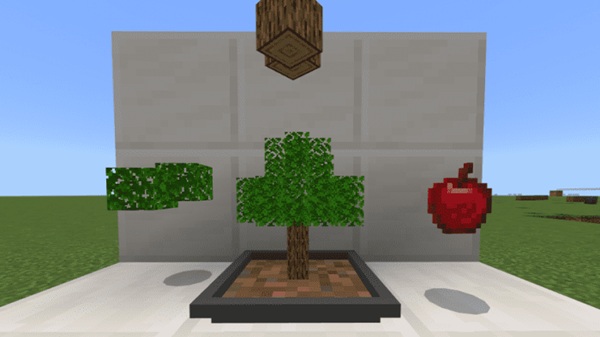
Bonsai pots allow trees and plants to grow in a single block-sized setup. You can place them indoors, underground, or inside compact bases without changing your build style. This works especially well for players who like organized layouts.
Automatic Plant Growth Over Time
Once you place a sapling or supported plant into a bonsai pot, it grows automatically. You don’t need to break blocks repeatedly or replant after every harvest. Resources generate steadily while you focus on other activities.
No Redstone or Commands Required
Easy Bonsai Addon avoids redstone completely. There are no pistons, observers, or command blocks involved. This makes the addon accessible to beginners and players who prefer simple mechanics.
Survival-Friendly and Easy to Use
Everything in Easy Bonsai Addon feels natural in survival mode. You place a pot, add a plant, and let it grow. There’s no learning curve, which makes it suitable for younger players and casual MCPE users.
Vanilla-Friendly Trees and Crops
The addon supports common Minecraft saplings and crops, keeping gameplay familiar. You won’t need to learn dozens of new items or systems, which helps the addon blend smoothly into existing worlds.
Lightweight and Mobile-Optimized
Easy Bonsai Addon is built to run efficiently on Android, iOS, and Windows Bedrock devices. While performance always depends on your device and world size, the addon avoids heavy mechanics that cause lag.
How the Bonsai System Works In-Game
The bonsai system is intentionally simple so it feels intuitive during normal play. You place a bonsai pot on a solid block, interact with it using a sapling or supported plant, and the growth process starts automatically.
Over time, the plant produces resources without manual harvesting. The system is balanced to feel rewarding without being overpowered, making it suitable for long-term survival worlds.
Best Use Cases for This Addon
Easy Bonsai Addon fits naturally into several playstyles:
-
Survival bases that need steady wood or crop supplies
-
Skyblock and One Block progression
-
Indoor or underground builds
-
Casual sessions where time is limited
If you enjoy building, exploring, or adventuring more than repetitive farming, this addon supports that playstyle well.
Compatibility and Device Support
Easy Bonsai Addon is designed for:
-
Minecraft Bedrock Edition
-
Android phones and tablets
-
iOS devices
-
Windows Bedrock
It is not compatible with Java Edition. Performance may vary based on device power, number of bonsai pots, and other active addons.
Performance and Gameplay Tips
To keep your world running smoothly:
-
Avoid placing too many bonsai pots in one chunk
-
Spread pots across your base
-
Keep layouts clean and organized
-
Backup your world before adding addons
-
Test compatibility when using multiple farming addons
These small steps help maintain stable performance over time.
Who Should Use Easy Bonsai Addon
Easy Bonsai Addon is a great fit for:
-
MCPE players who avoid redstone
-
Casual survival players
-
Skyblock and challenge-map fans
-
Beginners and younger players
-
Anyone who prefers clean, efficient resource generation
If you enjoy calm progression and organized bases, this addon aligns well with your playstyle.
Summary and Final Notes
The Easy Bonsai Addon delivers compact, reliable farming for Minecraft Bedrock players who want efficiency without complexity. By removing redstone and large farm layouts, it makes resource generation easier to manage—especially on mobile devices.
Whether you’re improving a small survival base or advancing through a Skyblock challenge, Easy Bonsai Addon helps you spend less time farming and more time enjoying your world.
How to Install Easy Bonsai Addon on MCPE
Installing Easy Bonsai Addon is straightforward:
-
Download the addon from a trusted source
-
Open the
.mcaddonor.mcpackfile -
Import it into Minecraft
-
Enable the Behavior Pack in world settings
-
Enable the Resource Pack if included
-
Turn on Experimental Gameplay if required
For the smoothest experience, installing the addon in a new world is recommended.