Feudal Furniture 1.21+
The Feudal Furniture Addon adds vanilla-style medieval furniture to Minecraft Bedrock and MCPE, helping you decorate castles, villages, and interiors with furniture that blends naturally into the game’s original style.

Feudal Furniture Addon – Vanilla-Style Medieval Furniture
The Feudal Furniture Addon brings carefully designed medieval furniture to Minecraft Bedrock Edition while staying true to the vanilla Minecraft look and feel. If you enjoy building castles, villages, or roleplay worlds, this addon helps you transform empty interiors into spaces that feel lived in and purposeful—without changing how Minecraft normally plays.
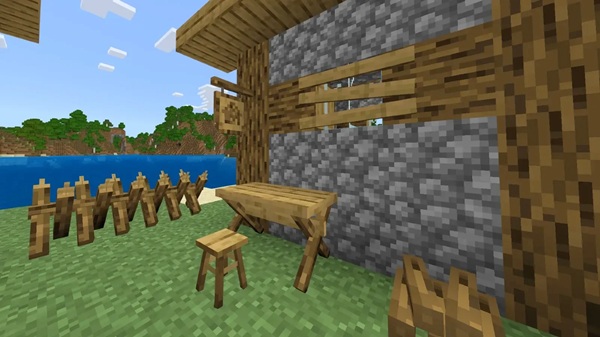
Built with MCPE players in mind, the Feudal Furniture Addon focuses on smooth performance, simple installation, and designs that naturally blend with existing blocks. Whether you play in Creative, Survival, or multiplayer worlds, it fits easily into your current setup.
Overview
Interior design is often where medieval builds fall short. You might spend hours shaping stone walls and towers, only to walk inside and find wide, empty rooms. This is exactly where the Feudal Furniture Addon makes a difference.
By adding vanilla-style medieval furniture, the addon fills that missing gap. Instead of modern or overly detailed objects, every piece feels like it belongs in Minecraft’s world. The goal is simple: help you decorate castles, villages, and homes while keeping the original Minecraft atmosphere intact.
This addon is especially well suited for:
-
Builders who focus on medieval architecture
-
Survival players who upgrade their bases over time
-
Roleplay and community worlds that value immersion
Key Features
The Feudal Furniture Addon is built around practical design choices that enhance gameplay without overwhelming it. Each feature focuses on usability, visual consistency, and MCPE compatibility.
Vanilla-Style Medieval Design
All furniture follows Minecraft’s classic blocky style. Textures remain clean and simple, making them easy to combine with default blocks and vanilla-inspired resource packs. As a result, your builds stay cohesive rather than looking modded or mismatched.
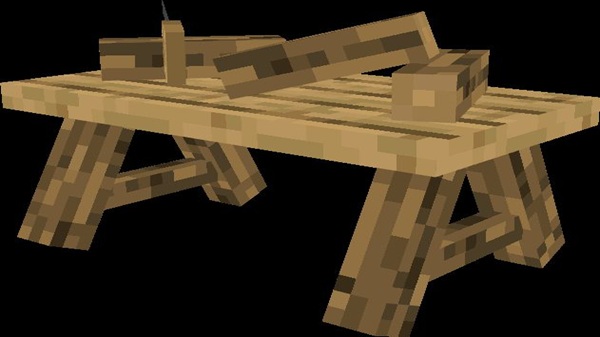
Wide Range of Medieval Furniture
The addon includes furniture commonly found in medieval environments, such as:
-
Chairs, benches, and throne-style seating
-
Tables for dining halls and interiors
-
Decorative blocks for walls and rooms
These pieces work equally well in small houses or large castles, giving you freedom in both compact and large-scale builds.
Multiple Wood Variants
Furniture supports multiple Minecraft wood types, allowing you to:
-
Match interiors to different biomes
-
Keep a consistent style in survival worlds
-
Avoid mixing unrelated materials
This feature feels especially natural when you progress through Survival mode using local resources.
Works in Creative and Survival Mode
The Feudal Furniture Addon adapts to different playstyles:
-
Creative Mode offers quick access for testing and building
-
Survival Mode uses a structured crafting system
No commands or advanced setup are required, which keeps the experience accessible for all players.
Optimized for MCPE Performance
Mobile performance matters. The addon avoids unnecessary complexity and remains lightweight, helping it run smoothly on MCPE devices. This makes it suitable for long-term worlds and shared multiplayer environments.
Multiplayer and Realm Friendly
Furniture behaves consistently across players, making it reliable for:
-
Multiplayer worlds
-
Community towns
-
Roleplay servers
This consistency helps avoid confusion when building together.
Furniture Categories Included
To keep things organized, the Feudal Furniture Addon groups furniture into logical categories. This structure makes planning and decorating much easier.
Common categories include:
-
Seating: chairs, benches, thrones
-
Tables: dining and interior surfaces
-
Decorative storage-style blocks
-
Lighting elements: medieval-inspired lamps
-
Decorative props: details for castles and villages
These categories help you quickly find the right pieces while designing interiors.
How It Works in MCPE
Understanding how the addon works in different modes helps you use it more effectively, especially on mobile.
Creative Mode
In Creative Mode, furniture appears directly in the Creative inventory. You can place items like normal blocks, making it easy to test layouts, design rooms, and plan large projects.
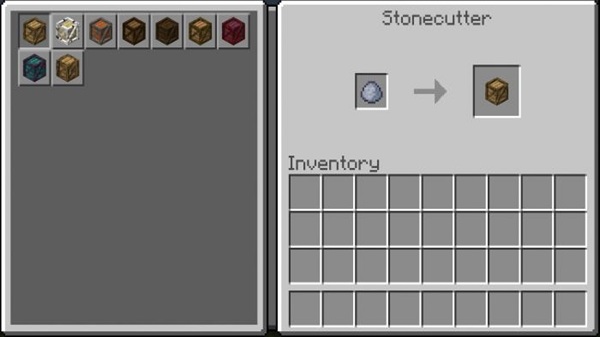
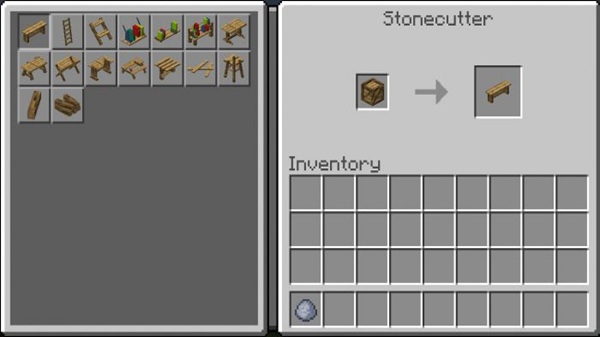
Survival Mode
In Survival Mode, the addon uses a stonecutter-based crafting system. Furniture is grouped by category, keeping recipes organized and avoiding clutter. This system feels like a natural extension of vanilla gameplay rather than a shortcut.
Compatibility & Performance
Before installing any addon, compatibility is a common concern—especially for MCPE users.
Supported Versions
The Feudal Furniture Addon supports recent Minecraft Bedrock and MCPE versions and is maintained for stability across updates.
Supported Platforms
-
Android (MCPE)
-
iOS (iPhone and iPad)
-
Windows Bedrock Edition
-
Bedrock-based consoles
Performance Notes
The addon is designed for smooth gameplay, with minimal impact on frame rate when used normally.
Best Use Cases
This addon shines in builds where interior detail matters most:
-
Castle interiors and throne rooms
-
Medieval villages and towns
-
Roleplay and community worlds
-
Survival base decoration and upgrades
It’s a strong choice if atmosphere and realism matter to you.
Tips for Best Results
-
Combine with medieval-themed texture packs
-
Use furniture to define room purpose
-
Test designs in Creative before Survival
-
Avoid overcrowding small rooms on low-end devices
Small choices like these can greatly improve visual results.
Final Notes
The Feudal Furniture Addon offers a balanced approach to medieval decoration in Minecraft Bedrock Edition. By staying true to vanilla style and focusing on performance, it gives you creative freedom without sacrificing stability.
If you enjoy building worlds that feel complete and immersive, this addon fits naturally into your MCPE experience—quietly enhancing your builds while letting Minecraft remain Minecraft.
Installation Guide (MCPE / Bedrock)
Installing the Feudal Furniture Addon on MCPE is straightforward and beginner-friendly.
Basic Installation Steps
-
Download the addon file (
.mcaddonor.mcpack) -
Open the file with Minecraft
-
Let the Resource Pack and Behavior Pack import
World Setup
-
Activate both packs in world settings
-
Enable required experimental features if prompted
-
Create a new world when experimental features are enabled
Mobile Notes
-
Rename files if they download as
.zip -
Use a proper file manager if needed
Once installed, the furniture becomes available immediately.