Items Durability 1.21+
The Items Durability Addon adds exact durability numbers to tools, weapons, and armor in Minecraft Bedrock Edition. It removes guesswork, helps you plan better in survival, and keeps gameplay smooth and vanilla-friendly on MCPE.
Items Durability Addon – Exact Numbers, Zero Guessing
If you play Minecraft Bedrock Edition regularly, you’ve probably experienced this moment: you’re mining, building, or exploring, everything feels fine—and then your tool suddenly breaks. No warning. Just a vague durability bar that wasn’t clear enough. On MCPE, where screen space is limited and sessions are often shorter, that kind of guesswork quickly becomes frustrating.
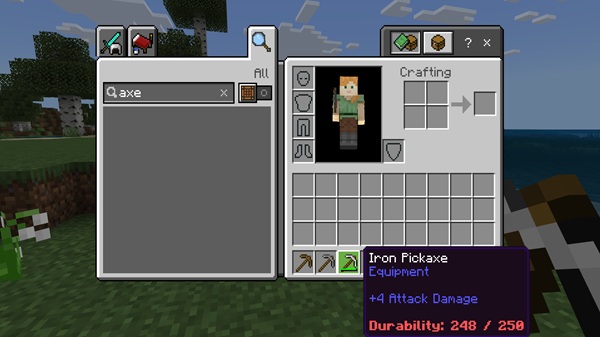
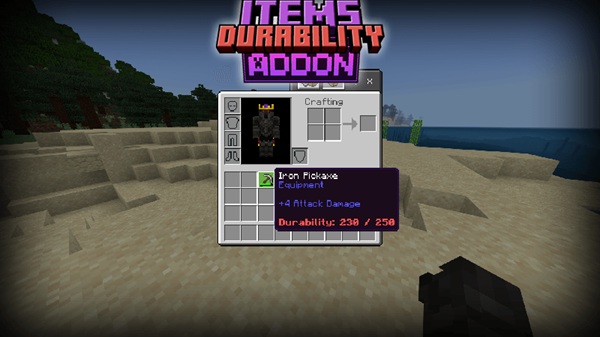
The Items Durability Addon exists to solve this exact problem. Instead of relying on estimates, it shows exact durability numbers for your tools, weapons, and armor. You get clear information, better control, and fewer interruptions during gameplay. No guessing. No surprises. Just smarter survival.
What Is Items Durability Addon?
At its core, the Items Durability Addon is a quality-of-life improvement for Minecraft Bedrock Edition. It focuses on one simple goal: making item durability clear and visible.
Before diving into features, it’s important to understand what this addon does—and what it doesn’t do.
Clear Purpose, Vanilla Balance
The addon displays precise durability values using data that already exists in the game. It does not change how tools wear down, how armor takes damage, or how enchantments work. Everything remains balanced and survival-friendly.
Designed for MCPE Players
Because MCPE players rely on touch controls and smaller screens, the addon prioritizes readability and simplicity. You get useful information without clutter or confusion.
This makes the Items Durability Addon suitable for:
-
Survival worlds
-
Long-term singleplayer saves
-
Multiplayer and Realm-style worlds (depending on pack type)
-
Modpacks focused on efficiency and realism
Key Features at a Glance
This section connects the promise of the title with real, practical benefits. Each feature supports the idea of exact numbers and zero guessing.
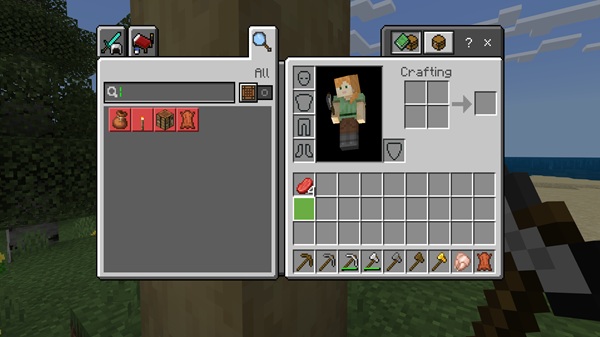
Exact Numeric Durability Display
Instead of a shrinking bar, items show their current and maximum durability, such as 154 / 2031. You always know how much life is left in your gear.
Real-Time Updates During Gameplay
Durability values update instantly while you mine, place blocks, or use items. There’s no need to reopen menus or pause what you’re doing.
Color-Coded Durability Indicators
To make reading easier at a glance:
-
Green means the item is in good condition
-
Yellow signals moderate wear
-
Red warns that the item is close to breaking
This visual system works especially well on mobile screens.
Supports Tools, Weapons, and Armor
The addon works with most vanilla equipment, including:
-
Mining and building tools
-
Melee and ranged weapons
-
Armor pieces, helping you avoid unexpected breaks
Mending Enchantment Compatibility
If an item has Mending, you can watch durability increase as you collect experience. This makes repair timing clearer and more satisfying.
Clean and Unobtrusive UI Design
The numbers are small, readable, and positioned carefully. They don’t block item icons or stack counts, which keeps the interface comfortable to use.
Lightweight and Performance-Safe
Because the addon focuses only on displaying data, it runs smoothly even on lower-end devices. There are no heavy textures or unnecessary effects.
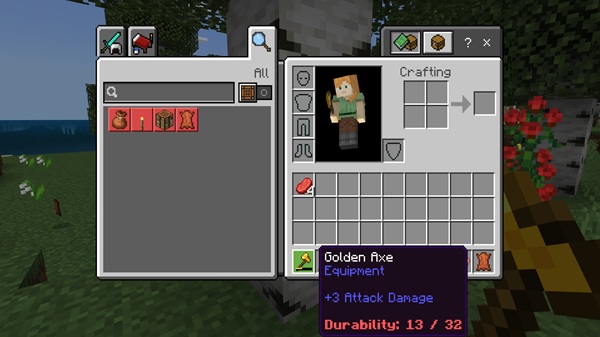
How It Works In-Game (MCPE Focused)
Once activated, the Items Durability Addon works automatically in the background, without changing how you play.
Automatic Display
Durability numbers appear in your inventory and hotbar as soon as the addon is enabled. No setup or commands are required.
Seamless Integration
As you use items, the numbers update naturally. Mining, building, and exploring all feel the same—just clearer.
No Gameplay Changes
The addon does not add menus, new systems, or learning curves. It simply makes existing mechanics easier to understand.
Why Exact Numbers Matter in Survival
Durability might seem like a small detail, but in survival gameplay, it affects nearly every decision you make.
Better Planning
Knowing exact durability helps you decide when to:
-
Bring backup tools
-
Head back to base
-
Repair items before they break
Less Frustration
You avoid losing tools in inconvenient places, such as deep caves or long exploration routes.
More Confident Play
Instead of checking your inventory constantly, you can focus on building, mining, or exploring with confidence.
For MCPE players who often play in shorter sessions, this clarity makes every minute count.
Compatibility & Requirements
Before installing, it helps to know where the addon works best.
Supported Platforms
-
Android
-
iOS
-
Windows 10/11 (Bedrock Edition)
Minecraft Versions
-
Designed for modern Bedrock versions (1.20+)
Notes on Compatibility
-
May conflict with other UI-modifying resource packs
-
Recommended to place it above other UI packs in the load order
Tips for Best Experience
A few simple steps can improve your experience:
-
Always back up your world before installing addons
-
Enable required experimental settings if numbers don’t appear
-
Check subpack options for UI adjustments
-
Test the addon in a new world if conflicts occur
These habits help keep your worlds stable and enjoyable.
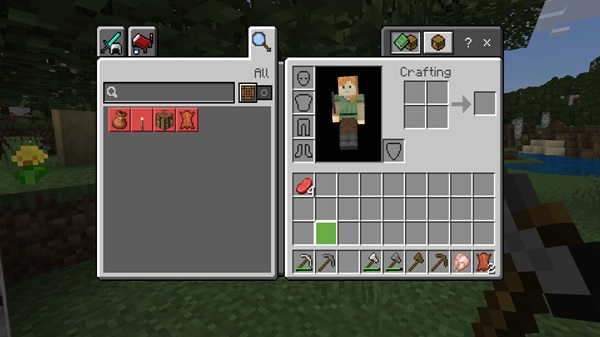
Who This Addon Is For
The Items Durability Addon fits naturally into many playstyles:
-
Survival-focused players
-
Builders working on large projects
-
Miners who spend long sessions underground
-
Explorers traveling far from base
-
MCPE players who prefer small, meaningful improvements
If you enjoy vanilla gameplay but want clearer information, this addon is a strong addition.
Final Summary
The Items Durability Addon – Exact Numbers, Zero Guessing delivers clarity where Bedrock players need it most. By showing precise durability values, it removes uncertainty without changing core mechanics.
It’s lightweight, survival-friendly, and designed with MCPE players in mind. If you want to plan better, avoid unnecessary tool breaks, and enjoy smoother survival gameplay, this addon is a practical upgrade that fits seamlessly into your world.
How to Install on MCPE (Step-by-Step)
Installing the Items Durability Addon is straightforward:
-
Download the addon file (usually
.mcpack) -
Open the file to import it into Minecraft
-
Activate it under Resource Packs
-
Activate the Behavior Pack if the addon includes one
-
Enable experimental features if required
After activation, enter or reload your world.